

Screenshots
Etc-an-update runs in a terminal. However it does use the graphical KDiff3 if you...
- choose to view a merge result, or
- if a manual merge is performed.
A typical run
After running the command, no further user input is required to accept these 2 updates...
# etc-an-update
/etc/hotplug/usb/._cfg0000_libsane.usermap
No local changes in "/etc/hotplug/usb/libsane.usermap".
Store new baseline, and accept the update... done
/etc/sane.d/._cfg0000_dll.conf
No local changes in "/etc/sane.d/dll.conf".
Store new baseline, and accept the update... done
2 updates merged.
Another run
This time an automatic merge will be performed.
NOTE: How little user input is required (the user input is shown in bold). Imagine how much work the user would have to do if using a different tool!
# etc-an-update
/etc/postfix/._cfg0000_main.cf
MERGE WITH ANCESTER
===================
current working copy: /etc/postfix/main.cf
package update: /etc/postfix/._cfg0000_main.cf
baseline copy (ancester): /var/db/baselineConfig/etc~_postfix~_main.cf
need to produce merged file: /var/db/baselineConfig/etc~_postfix~_main.cf.merged
Merge with ancester OK, no conflict was found
At this point the merge is complete! It could be accepted straight away. However the user decides to view the results...
===============================================
Options:
s: skip the merge for this file
a: accept merged file
NOTE: you can edit this externally before accepting, if you wish
v: view merge result
e: perform an(other) merge with ancester
Your choice: v
And so the following KDiff3 session appears...
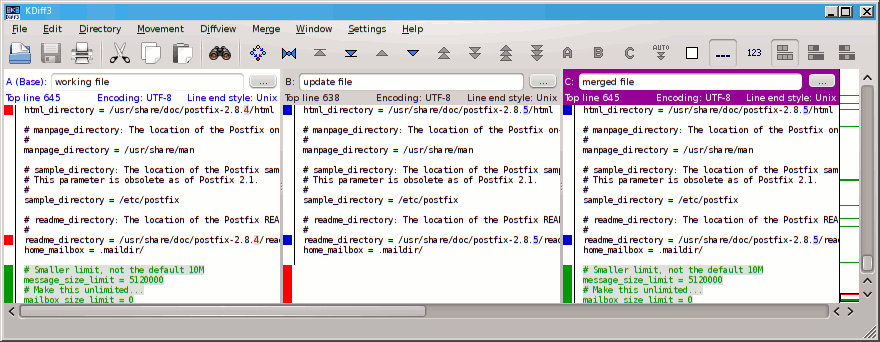
...you can see columns for the "working file", "update file", and "merged file".
Note that the following elements correctly made it into the merged result...
- my personalised config items, shown in green, to control my mail and mailbox size
- the incremented version number, from 2.8.4 to 2.8.5
...all done automatically!
Now the user closes KDiff3 and accepts the merge...
===============================================
Options:
s: skip the merge for this file
a: accept merged file
NOTE: you can edit this externally before accepting, if you wish
v: view merge result
e: perform an(other) merge with ancester
Your choice: a
===============================================
Accepting merged file: the following files will be moved...
1. backup:
/etc/postfix/main.cf
-> /etc/postfix/main.cf.old
2. backup:
/var/db/baselineConfig/etc~_postfix~_main.cf
-> /var/db/baselineConfig/etc~_postfix~_main.cf.old
3. accept the new working file:
/var/db/baselineConfig/etc~_postfix~_main.cf.merged
-> /etc/postfix/main.cf
4. update the baseline:
/etc/postfix/._cfg0000_main.cf
-> /var/db/baselineConfig/etc~_postfix~_main.cf
5. if all OK, remove /var/db/baselineConfig/etc~_postfix~_main.cf.old
Sure (y/n): y
Performing action: 1, 2, 3, 4, 5...done
1 updates merged.
All done! Easy!
FYI: If the user had selected option 'e' then they could have performed an assisted manual merge using KDiff3.